GIF & Image Paste is a free, always-available Windows desktop utility for people who constantly reuse GIFs and images in chat, forums, email, and social apps. Keep a personal library on your PC, add items from the clipboard, files, URLs, or drag-and-drop, then click to copy or drag into another app.
Getting started (recommended workflow)
Start with a small library of 10–20 items you paste every week. Add them using whichever method is fastest for you: clipboard paste from a browser, drag-and-drop from File Explorer, or URL import for a hosted image. Then practice the “select → paste” loop in your main chat app until it feels automatic.
Next, organize with favorites and tabs. Favorites are best for “daily drivers.” Tabs are best when you switch contexts (for example moderation vs streaming vs personal). If you skip organization early, libraries grow quickly and scrolling becomes slower—this is normal for any asset library tool.
For a longer walkthrough with Discord/Slack tips, backups, and troubleshooting patterns, read the Guides page.
How this differs from generic clipboard history
Windows and many apps offer clipboard history, but it is usually ephemeral and mixed with unrelated clips. GIF & Image Paste is optimized for a curated, visual library of images and GIFs you intentionally keep. The goal is speed and predictability: fewer surprises, fewer lost clips, fewer “where did that GIF go?” moments.
Security and trust
This project is distributed with open-source transparency on GitHub. If you are evaluating trust, review the repository, build from source if you prefer, and only download binaries from the official releases page linked from this site.
About this project
This site is the official home for the app. The program is distributed as a portable executable for Windows 10 and 11. Source code and release binaries are published on GitHub so you can verify what you are running. The app stores your library locally on your machine; it does not require an account to use the core features.
Development is independent (“indie”). If the tool saves you time, optional support is welcome via Buy Me a Coffee — it is not required to use the software.
For questions, bug reports, and feature ideas, please use GitHub Issues. That is the fastest way to reach the maintainer.
See it in action
Below are real screenshots of the main window, the slide-out menu, preview behavior, and tray integration.
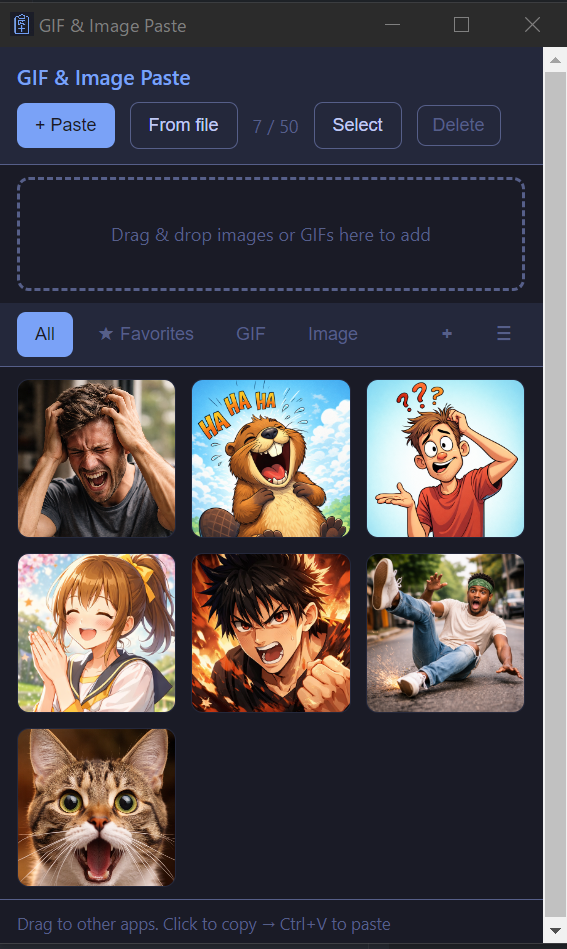
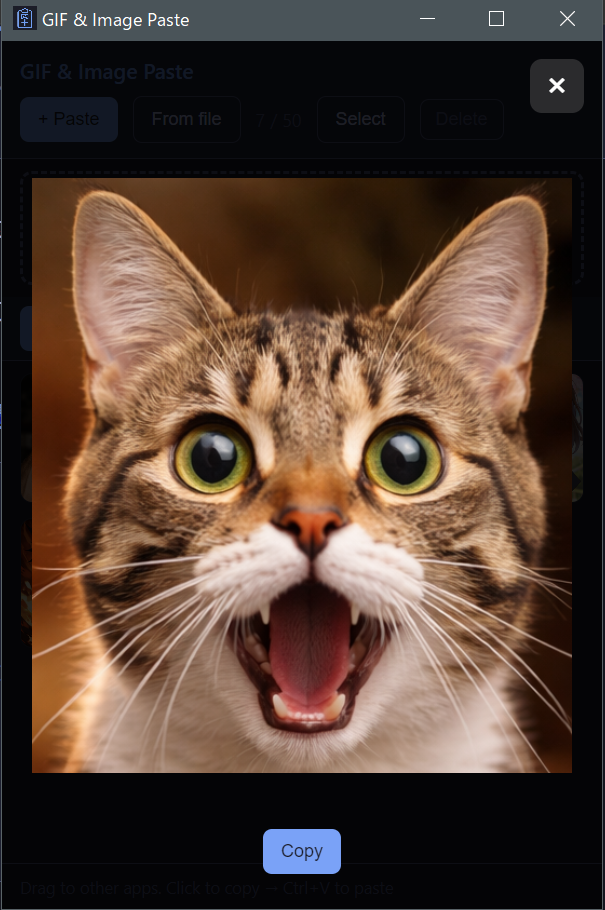
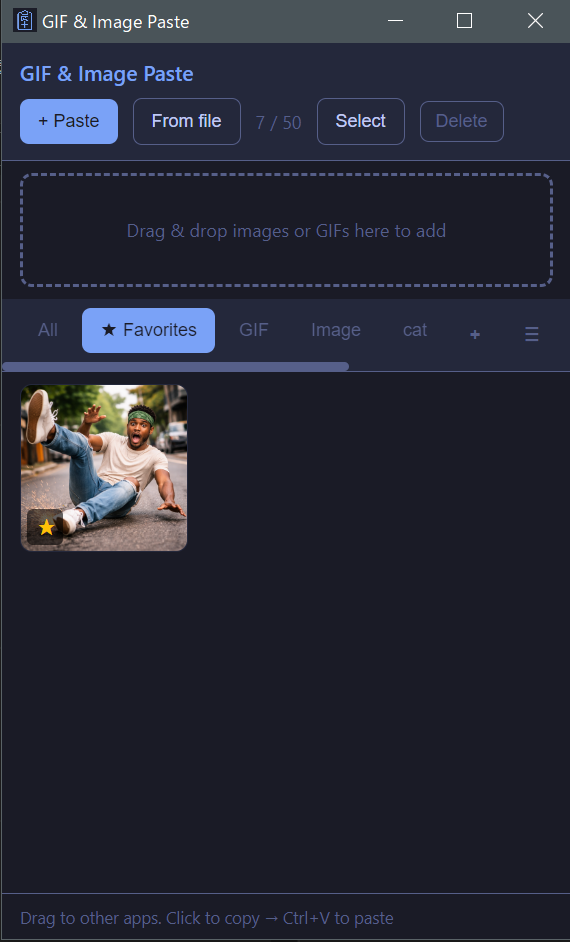
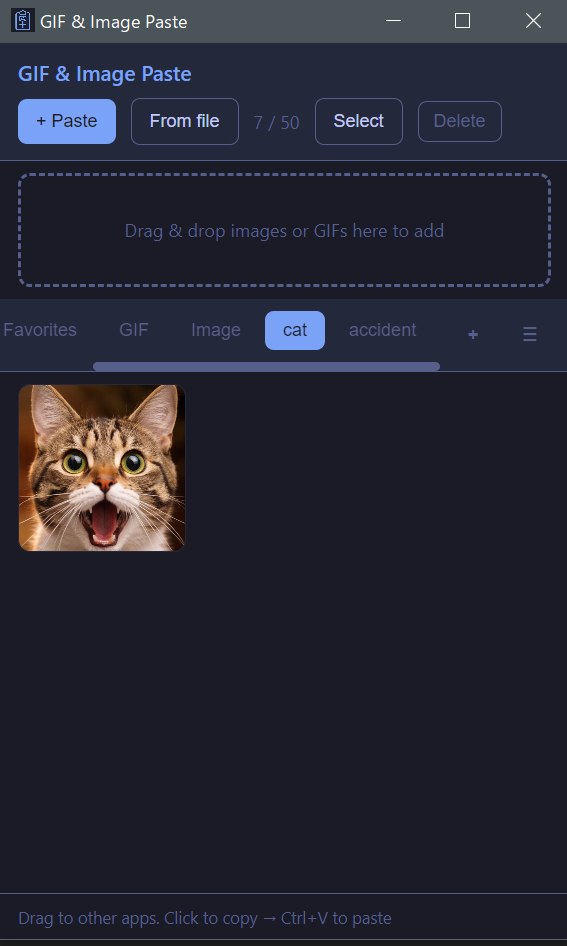
Features
- Add from anywhere — Clipboard (Ctrl+V), file picker, URL, or drag & drop
- Custom tabs — Create your own tabs and assign items to them. Organize by project or category, like folders.
- Favorites — Star items and filter by favorites for quick access.
- Preview on/off — Toggle in the menu: click an item to open a large preview (with copy), or click to copy straight to the clipboard.
- Paste anywhere — Click to copy, then Ctrl+V in Discord, Slack, emails, and more
- Always available — Stays in the system tray; optional always-on-top window
- Export — Save your library to a folder; quick export to the last-used folder
- GIF-friendly — Animated GIFs play on hover; supports PNG, JPG, WebP, BMP
Who it is for
Community managers, moderators, streamers, support staff, and anyone who pastes the same reaction GIFs or reference images many times per day. The goal is to reduce friction: one small window next to your chat or browser, instant access to your library.
How it works
- Download the latest portable
.exefrom GitHub Releases and run it. The app can stay in your system tray. - Add images via Paste, From file, From URL, or drag & drop into the window.
- Click an item to copy it to the clipboard, or drag the thumbnail into another application that accepts image drops.
Privacy & data (summary)
Your saved media and library metadata stay on your computer. The app may open network connections when you add an image from a URL, or when you open an external link (for example the project site or support page). Full details are in the Privacy Policy.
System requirements
- Windows 10 or 11 (64-bit)
- Portable executable — no installer required
Pricing
The app is fully free to use.
- No item cap — Save as many GIFs/images as you need for your workflow.
- No paid unlock — Organization features (tabs, favorites, export) are available to everyone.
Optional tips to support development: Buy Me a Coffee.
Download
Free for Windows. No account is required. Binaries and source are on GitHub.
Download for Windows (GitHub Releases)Choose the latest portable .exe in the release assets. If Windows SmartScreen warns about an unknown publisher, click More info → Run anyway — indie apps are often unsigned.
Support the project
If you find the app useful, you can support ongoing development on Buy Me a Coffee (optional). This is the official support page for GIF & Image Paste by SmartOps Lab.
Official support: buymeacoffee.com/smartopslab128
☕ Buy Me a Coffee